Hontana Font: Friendly Script for Web Design
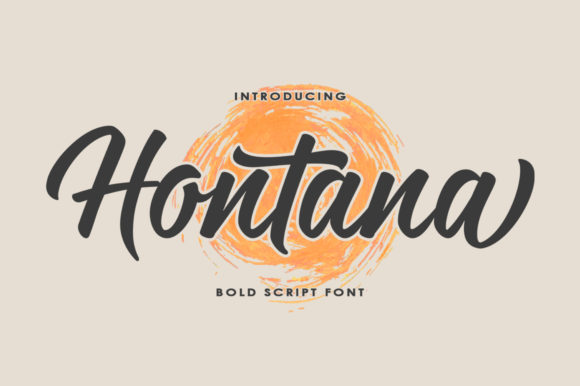
In the fast-paced world of digital product creation, every pixel contributes to the user experience. As web designers and UI specialists, we often obsess over grid systems, load times, and responsive breakpoints. Yet, one of the most immediate ways to establish a brand’s emotional connection with its audience is through typography. Enter Hontana, a cute and casual handwritten font that brings an incredibly friendly feel to digital interfaces. For designers working on landing pages, online stores, or personal portfolios, Hontana offers a unique blend of approachability and style that can significantly enhance visual hierarchy and brand tone.
The Personality of Handwritten Typography in Digital Spaces
Modern web design has moved beyond sterile, corporate aesthetics. Users crave authenticity. A handwritten font like Hontana bridges the gap between professional polish and human touch. Its casual strokes and organic rhythm mimic natural handwriting, which subconsciously signals trust and warmth to visitors. When you integrate Hontana into a website header or a hero section, you are not just displaying text; you are setting a conversational tone. This is particularly effective for brands that want to appear accessible, such as coaching services, boutique e-commerce shops, or creative agencies.
Unlike rigid geometric typefaces, Hontana introduces a sense of movement. This dynamic quality helps guide the eye across the screen, making it an excellent choice for short phrases, call-to-action buttons, or decorative accents. However, using a script font requires a delicate balance. It must remain legible while adding character. Hontana achieves this by maintaining clear letterforms that do not sacrifice readability for style, a crucial factor for maintaining low bounce rates on mobile devices.
Strategic Placement for Maximum Impact
To leverage Hontana effectively, you must understand where it fits within your layout’s visual hierarchy. It is primarily a display font, meaning it shines in large sizes and limited quantities. Here is how you can apply it across various digital projects:
- Hero Sections: Use Hontana for the main headline on a landing page to immediately capture attention. Pair it with a clean background image to ensure the text pops.
- Call-to-Action Areas: A button labeled with a friendly script can increase click-through rates by feeling less like a command and more like an invitation.
- Blog Graphics and Social Media: For content creators, Hontana is ideal for Instagram stories, Pinterest pins, and blog headers. It adds a cohesive aesthetic to social media graphics, reinforcing brand identity across platforms.
- Testimonials and Quotes: Highlighting customer reviews in a handwritten style adds authenticity and breaks up blocks of standard body copy.
Avoid using Hontana for long paragraphs or small body text. Its intricate details can become muddy at smaller sizes, especially on lower-resolution screens. Instead, reserve it for elements that need to stand out, such as section headings, logo text, or pull quotes.
Readability and Responsive Design Considerations
When implementing any creative font in web design, responsiveness is non-negotiable. Hontana looks stunning on desktop monitors, but how does it perform on mobile? On smaller screens, ensure you increase the line height and letter spacing slightly to prevent characters from overlapping. Test your layouts on various devices to confirm that the casual strokes remain distinct.
Contrast is another critical factor. Hontana works beautifully on both light and dark backgrounds, provided there is sufficient contrast. For image overlays, consider adding a subtle drop shadow or a semi-transparent backdrop behind the text to maintain legibility. If you are designing for an online store, ensure that product prices and essential navigation items remain in a highly readable sans serif font, using Hontana only for promotional banners or category titles.
Mastering Font Pairing for Brand Identity
The true power of Hontana emerges when paired with complementary typefaces. Since Hontana is expressive and organic, it needs a stable partner to ground the design. The most effective combination is pairing this script font with a neutral sans serif font. A clean, geometric sans serif provides the necessary structure for body copy, navigation menus, and secondary information, allowing Hontana to take center stage without overwhelming the user.
For a more editorial or sophisticated look, you might experiment with pairing Hontana with a modern serif font. This combination works well for lifestyle blogs, wedding portfolios, or luxury boutique websites. The serif adds a touch of tradition and elegance, while Hontana injects personality and modern flair. Remember, the goal of font pairing is to create contrast in weight and style while maintaining harmony in mood. Avoid pairing Hontana with other decorative or handwritten fonts, as this can create visual clutter and confuse the user’s scanning behavior.
Technical Implementation and Licensing
Before launching your next project, verify the technical specifications of your chosen premium font. Check if Hontana includes webfont formats such as WOFF and WOFF2, which are optimized for fast loading on websites. Slow-loading fonts can negatively impact SEO and user experience. Additionally, look for included styles, alternates, or ligatures that can add variety to your designs without needing multiple font files.
Licensing is equally important. Ensure you have the appropriate commercial font license for your intended use. If you are building a website for a client, an online store, or a digital template, you must confirm that your license covers web embedding and commercial distribution. Many font providers, including those in the Script Amp category, offer specific licenses for digital products. Using a font without the proper license can lead to legal issues and damage your professional reputation. Always read the end-user license agreement carefully to understand restrictions on page views, domains, and modification rights.
Elevating Your Digital Projects with Hontana
Incorporating Hontana into your design toolkit allows you to create more engaging and emotionally resonant web experiences. Whether you are designing a course sales page, a personal portfolio, or a branded app interface, this font adds a layer of humanity that pure geometry cannot achieve. By respecting its limitations regarding size and placement, and by pairing it thoughtfully with supportive typefaces, you can enhance visual hierarchy and drive user engagement.
Ultimately, typography is about communication. Hontana communicates friendliness, creativity, and approachability. In a digital landscape saturated with generic templates, using a distinctive typeface like Hontana helps your brand stand out. It transforms static text into a dynamic design element that invites users to stay, read, and connect. As you refine your next landing page or update your brand assets, consider how this casual handwritten font can support your goals for clarity, beauty, and conversion.